With WordPress 5.0 and up, the classic editor (TinyMCE) will be replaced with something newer and maybe easier, named Gutenberg (after the publisher who introduced printing in Europe).
The Gutenberg editor brings block-based editing to WordPress, similar to how Wix, Weebly, or Site123 organize their editing. This was actually the reason for the whole circus: the competition from the “free” website builders. What people don’t understand is that WordPress is REALLY free, IT is open source and is readily accessible. The lazy and sleazy anti-talents out there, say that WordPress as it was until the 5.0 version came up, was “hard to handle”.
Gutenberg Editor and the Classic Editor
[source: https://block-options.com/]
Prepare Your Website for the Gutenberg Editor
I know you can embrace everything new with joy, and you may notice the progress you made by adopting the block editor now, or even earlier when it was in beta. But let’s presume you always used your text editor, not the visual one, so you could write directly in HTML, especially because the visual version of your post in the editing phase is far and away from what appears in the preview.
First of all, update your WordPress installation to the most recent release. This is advisable especially because an older version is prone to weaknesses, it becomes vulnerable to attacks. I really don’t know why someone will attack your website outside of having some fun, otherwise, such a thing may end very badly for the attackers.
Use Gutenberg Editor and the Classic Editor at the Same Time, as You Want
Second, download and install the Classic Editor plugin (https://wordpress.org/plugins/classic-editor/). Activate it, with no fear in your finger!
Fig 1. classic editor plugin
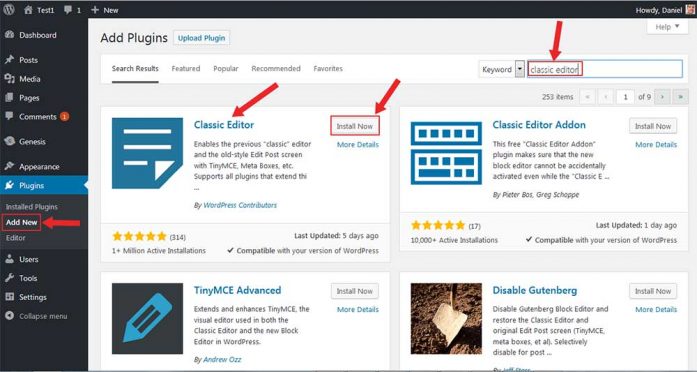
Classic Editor Plugin
You can now click on its “Settings” button on the plugins section, which will direct you to the “Writing” section of your WordPress dashboard “settings”, as in the picture below. You can go directly there if you please, but I just wanted to explain a little, the process.
Fig 2. settings writing
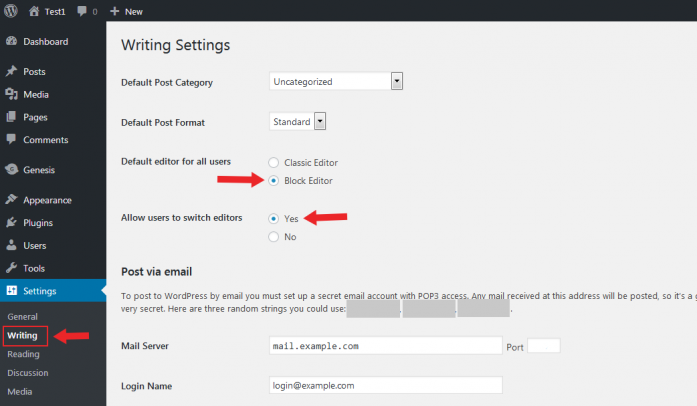
Settings: Writing
Here, it is up to you what you choose for default: the Classic Editor or the Block Editor. Additionally, you can let the other authors on your website have their choice in the matter if they want, so you may allow users to switch editors by clicking the “Yes” button.
Let us say you leave the block editor as default. Having installed the Classic Editor plugin, when you want to add a new post, and you don’t like how you have to proceed next, or maybe you are just confused about using the “blocks”, you will still have the choice to switch to the classic editor, on this very screen. Check out the picture below!
Fig 3. Switch to classic editor option
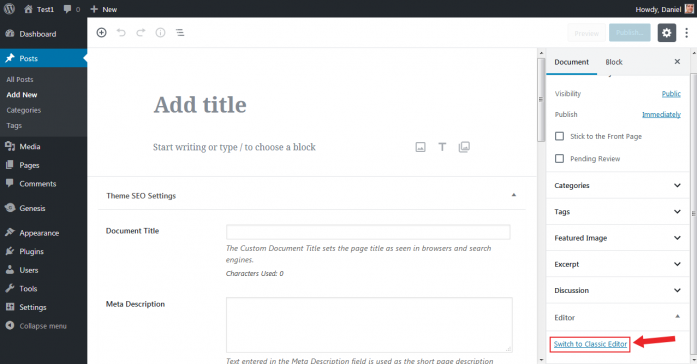
The option to switch to the classical editor
If you have a different screen, just look for the “Editor” block and click on the button! You may continue your article from there because you have switched to what you were accustomed to.
More than that, on your “All posts” screen, when you hover over a post in your list, you have now the options to choose what editor to use if you want to edit the post. It’s the same with the drafts, too, as you can see in the picture below
Fig 4. Media: posts_hover
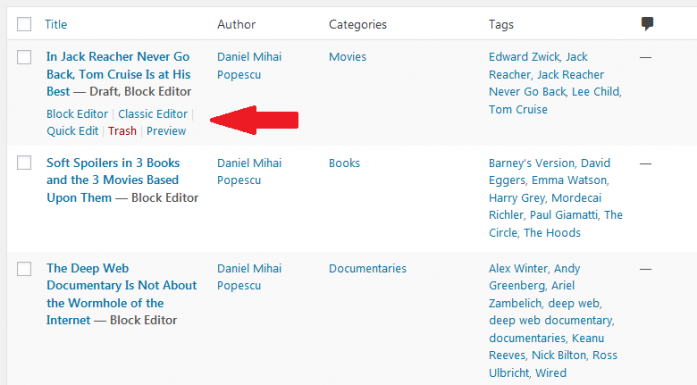
Posts hover
If you don’t like the new block editor at all, you can make the Classic Editor open by default when you want to write a new post, by fixing this in the “Writing” drop menu in settings, the one shown in Fig 2.
Next in WordPress
Let’s say that we solved the pain of learning a new method of posting, by now. The bad side of this is that the developers, will work from now on to new plugins and themes adapted to the Gutenberg editor, so if they will be so really smashing, as they say, you will not have the pleasure to experiment on them. I personally do not believe all this. Theme developers, like the guys from StudioPress, of which I am a user and affiliate, already claim in their selling pitch that they have six (for now, of course) theme adapted to Gutenberg. Bad pitch, don’t you think? You bought some other themes from them, and they are not “Gutenberg ready”. If you are dumb, you may fall into a depression, don’t you? Well, don’t get depressed. Your hard-working website/blog won’t crush now.
All in all, if the new editor will ease your writing and publishing articles for your blog, why not use it? We’ll see what will happen :).
If you liked what you read (and for that I humbly thank you for your patience), subscribe to this blog by Email! Follow this blog on Twitter, and on Facebook! For a joyous day, check out my pins on Pinterest or my grams on Instagram 😄. I hope you like this blog so much that you think it’s time to take a step further by becoming yourself a blogger; in order to do that have the kindness to read the Own Your Website offer I have prepared for you! You won’t regret. Thanks for passing by 😄 Speak your mind, don’t be shy!

