I am not a native English person, and this blog isn’t a pure breed English blog as well. English is simple because it is a language without diacritics. This is a great advantage for foreigners, they write faster in English because of the standard keyboards. They write faster in English and maybe faster (without the eventual diacritics) in their own language, because of the same standard keyboard.
Microsoft Windows Logo
Of course, for some foreigners the real difficulty may appear with speaking, because of the English specific accents, but that’s a common issue for almost all languages. My purpose with this article is to create a tutorial destined to writers of languages different than English, who want to type using a standard PC.
Here are some characters looking better this way than without their specific characteristics: é, à, ç, è, ü, ß, ä, ă, î, ş, ţ, â, ğ, ö, ı, ñ, ¿. I use my normal keyboard, without accessing the Character Map from Accessories >>> System Tools. I used the Language Bar in my toolbar, by adding languages to it. And this is a very simple process which I’m going to show to you with some printed screen pics with explanations. Of course, there are some proud countries which were offered their own keyboard type and the mighty Windows in their native language, but believe me that one may type in any invented language with an official grammar Microsoft had knowledge of. This is not an ode to Microsoft and their extraordinary XP Windows System. This is just a simple tutorial, using as example the Windows XP. First one have to click on start button or on the windows button, to open the start menu.
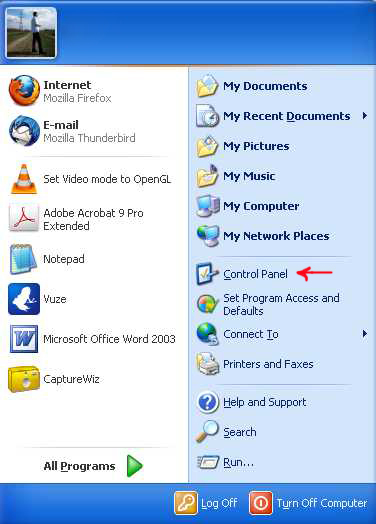
Start Menu in XP
You have to access the Control Panel, so you click on the control panel button.
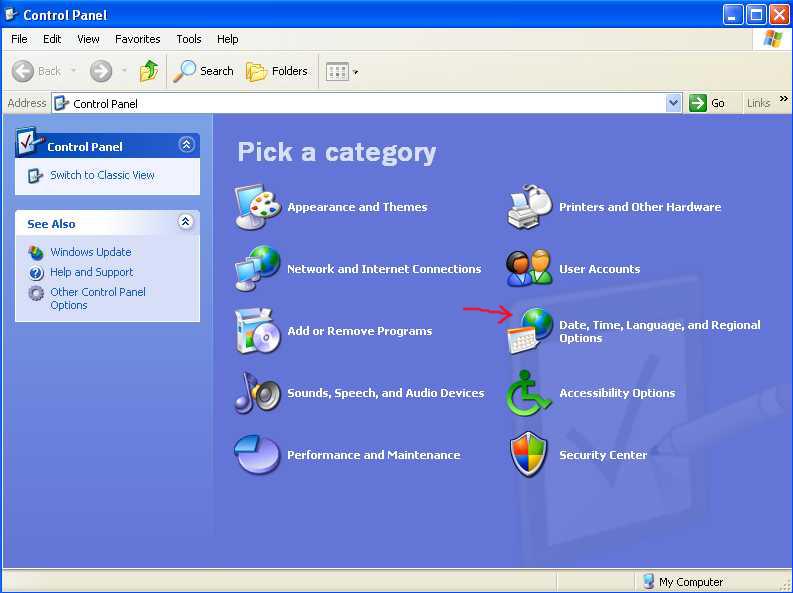
Control Panel
After you opened the Control Panel, click on Date, Time, Language and Regional Options. The next screen will open:
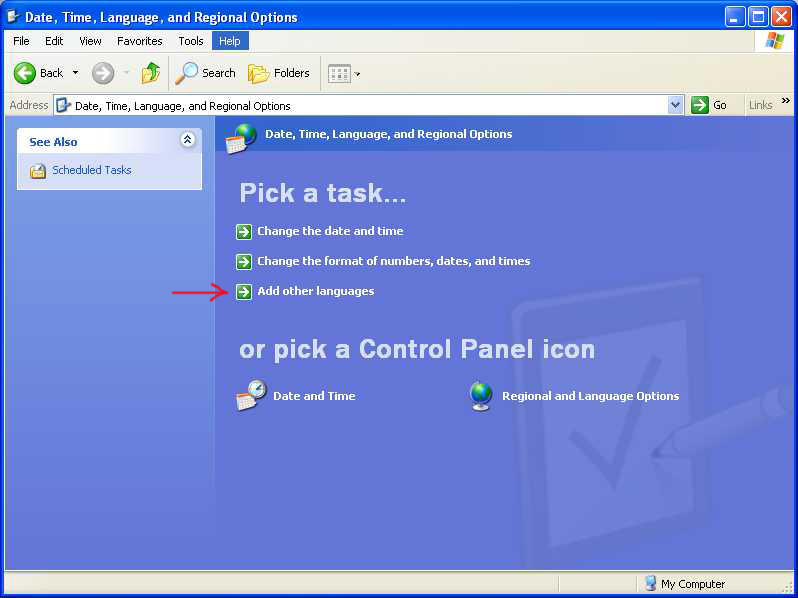
Time, Date, Language, and Regional Options
You click now, on Add other languages.
Add New Languages
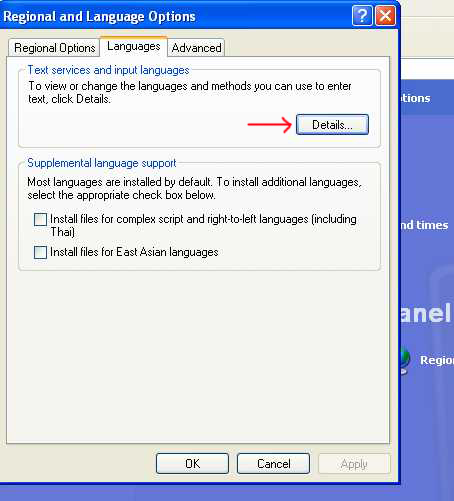
This small screen opened and you click the Details button, see what happens.
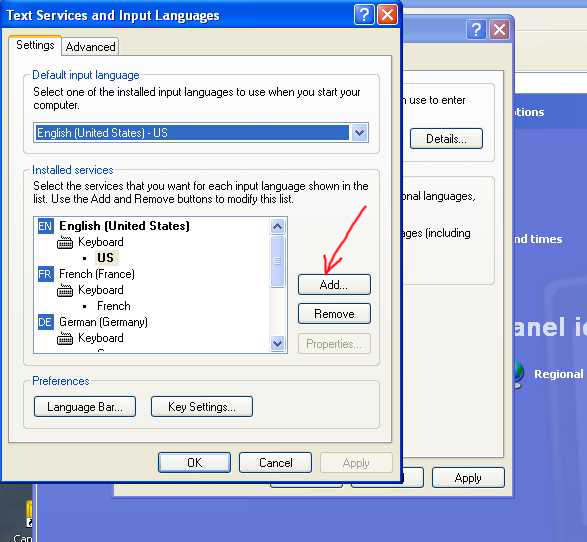
Text Services and Input Languages
This screen is what happened, so, to add another language, click Add, where the arrow is. The picture samples are made with this laptop I use, so I’ve added just for this tutorial, the Spanish language, as you’re going to see next.
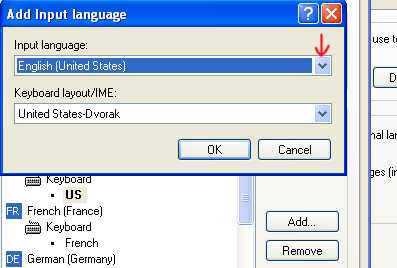
Add Input Language
Another small window pops out, and as you see, the English (United States) was set, so you click on the right small arrow to make the languages options to drop down:
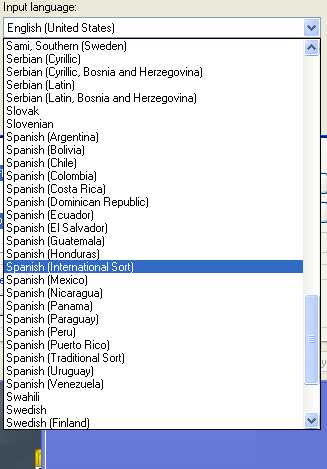
Choose Spanish
There are a lot of versions of Spanish, it seems Microsoft makes its homework sometimes more than well enough. So I choose the “International Sort”, just to be sure.
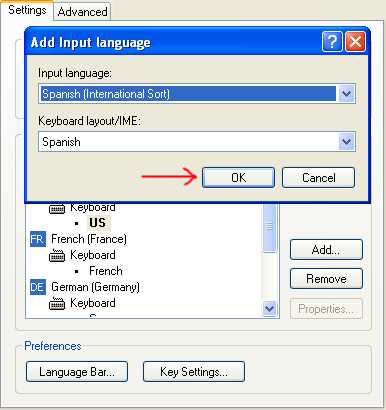
Spanish International Sort
The options dropped off, now you have to click on OK as my arrow shows, and
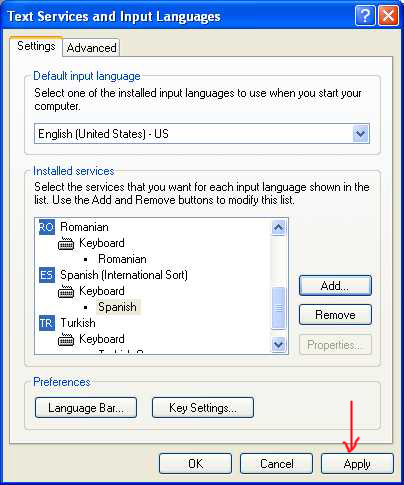
Click Apply
you are left with the option to click Apply for the language to be added.
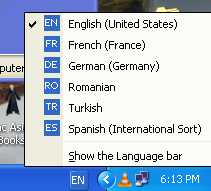
Spanish Option Appears
This is the bottom right corner of my screen. Clicking on EN button on my bottom toolbar, another pop up small screen appears, which shows me all the language option I have, to type in.
Now comes the exciting part for you, who are a writer in your native language. You have to figure out where the diacritics are on the keyboard. So type and see for yourself. With the exception of the French option, where the letters are in different positions than the English and all the others who use the Latin Alphabet as character base, the diacritics are in other positions than the letters already on the keyboard. With a little practice, you’ll become an expert to type in your own language with the American machine made in China, of course, 🙂
Another small tip, the Turks have instead of “i” character, the “ı” one, “i” being in another place, in the extreme right of the third row, they having as well a specific different keyboard not all the time recognized by the international services, and the Romanians have the “y” reversed with the “z”.
Encoding the writing in e-mails, is better to be set in UTF-8, one of the most comprehensive of all the existent versions. Unfortunately, not all the internet fonts are adapted to accept diacritics, especially the fancy ones, but what people currently use, are accepted by all the existent platforms : Arial, Times News Roman, etc..
Good luck and enjoy, 🙂 ….
If you liked what you read (and for that I humbly thank you for your patience), subscribe to this blog by Email! Follow this blog on Twitter, and on Facebook! For a joyous day, check out my pins on Pinterest or my grams on Instagram 😄. I hope you like this blog so much that you think it’s time to take a step further by becoming yourself a blogger; in order to do that have the kindness to read the Own Your Website offer I have prepared for you! You won’t regret. Thanks for passing by 😄 Speak your mind, don’t be shy!
Copyright © 2011 Rodolfo Grimaldi Blog – Internationally Writing


Mr. Grimaldi is, quite simply, brilliant
you went to a lot of trouble to put together that tutorial. It will help a lot of people communicate and, as long as you are talking, there is less incentive for problems to separate groups of people.
Thank you very much for the appreciations. This post is a result of what I met on the internet, browsing things in different languages. Some of these, I can even understand, 🙂