• Books
  • TV
  • Blogging
    • Tutorials
  • Pills
  • Life
  • Movies
    • Personalities
    • Comedy
    • Awards
    • Foreign Language Movies
      • Korean
      • Indian
    • Classics
    • Animation
    • Lists
    • Documentaries
    • Shorts
    • Spoiler Alert
  • Social Media
  • The Shadows
  • Travel

Rodolfo Grimaldi Blog

Alternative opinions by Daniel Mihai Popescu

  • Home
  • About Me
    • About This Blog
  • Cookie Policy
  • Blogroll
  • Offer!
  • Contact Me!

Rich Pins – Awesome!

September 12, 2014 By Daniel Mihai Popescu Leave a Comment

Pinterest for Business launched Rich Pins are Pins that automatically include extra details on the Pin. When you use Rich Pins, you make your Pins more useful to Pinners who are looking for the the information they need to make the recipe, plan the trip, or buy the product.

Rich Pins are designed to help your business stand out in search results. (It also helps that Rich Pins rank higher in search, too!) And when you stand out on Pinterest, you’re more likely to get re-pinned and clicked.
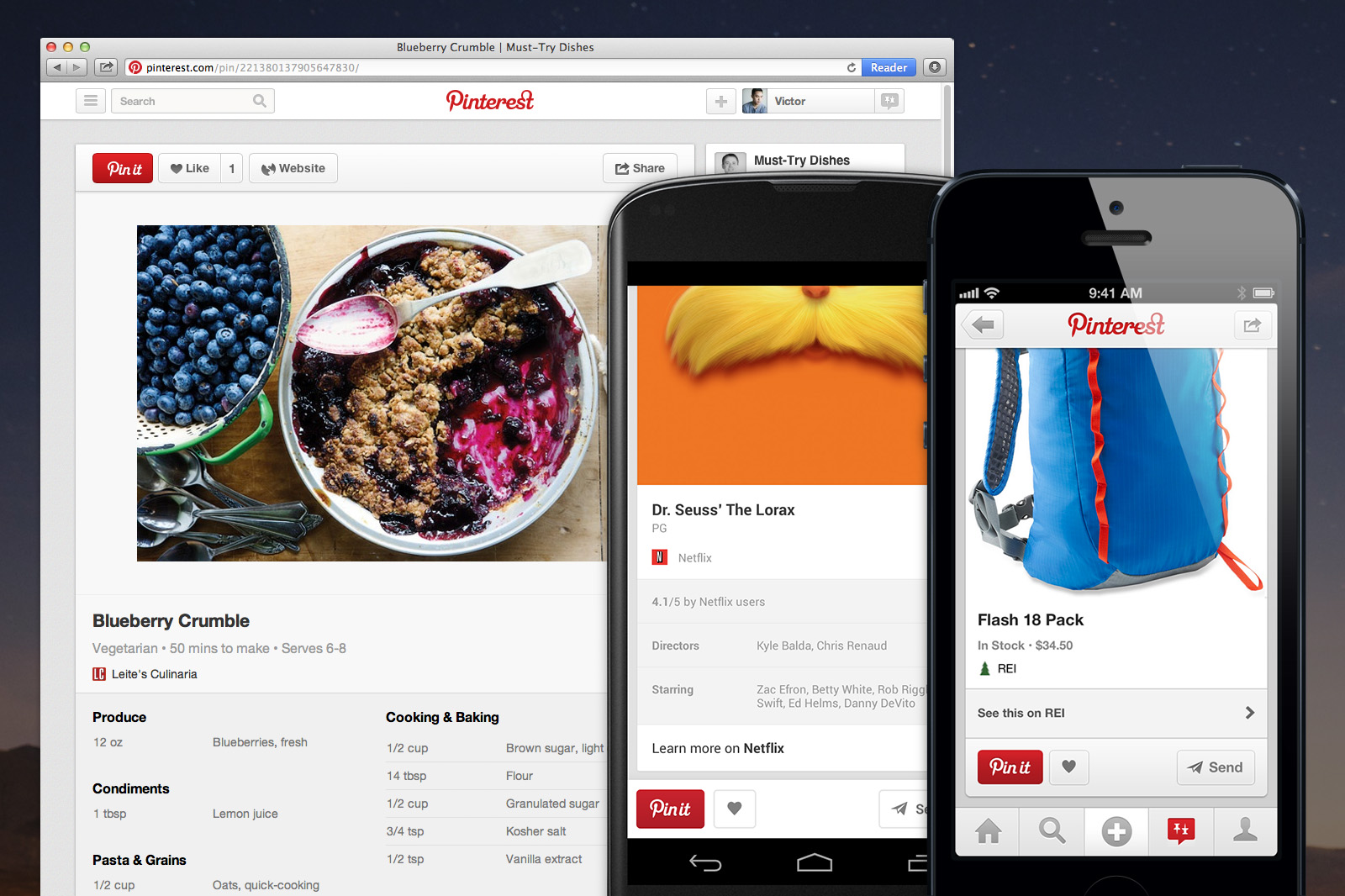
How a rich pin looks. This is a "recipe" rich pin

How a rich pin looks. This is a “recipe” rich pin


[source]

For the moment, there are five types of Rich Pins: product, place, article, recipe and movie. To get started, you’ll need to prep your website with meta tags, test out your Rich Pins and apply to get them on Pinterest. Read our documentation for more guidance. If you’re not technical, you might want to ask your developer or site owner to help!

The five Rich Pin types are as follows:

1. Product Pins

Product Pins include real time pricing, availability and where to buy. Pinners also get email notifications when product Pins they’ve added drop in price.

Product Pins can be used to:

  • Showcase your latest products
  • Organize your merchandise by event, holiday or season
  • Create wish lists and gift guides
  •  

    2. Place Pins

    Place Pins include a map, address and phone number.

    Place Pins can be used to:

  • Create guides to different places around the world
  • Map out anything around the world (best golf courses, best pizza, strangest street art)
  • Share your different locations, or the story behind your products or company
  •  

    3. Article Pins

    Article Pins include headline, author and story description, helping Pinners find and save stories that matter to them.

    Article Pins can be used to:

  • Share article and blog content from your website
  • Curate good reads on a subject relevant to your business
  • Add pieces that inspired your work or products
  •  

    4. Recipe Pins

    Recipe Pins include ingredients, cooking times and serving info to get Pinterest cooks excited to hit the kitchen.

    Recipe Pins can be used to:

  • Collect recipes that use or include your products
  • Curate meal ideas by season, holiday or event
  • Create food pairings that match your business interests (e.g. a home improvement store adding recipes for grilling)
  •  

    5. Movie Pins

    Movie Pins include ratings, cast members and reviews to help Pinners learn about new flicks.

    Movie Pins can be used to:

  • Collect movies around a theme or season
  • Curate movies that inspired your business
  •  

    How to apply for Rich Pins:

  • 1. Decide what kind of Rich Pin ( product, recipe, movie, article or place ) you want to apply for;
  • 2. Read the documentation for your rich pin type;
  • 3. Add the appropriate metatags to your site;
  • 4. Validate your Rich Pins and apply to get them on Pinterest.
  • You can find the Rich Pin Validator by clicking the link.

    To add Rich Pins to your site, you need to:

  • 1. Prepare your website with meta tags or an oEmbed endpoint. This can be a bit technical, so you might need to talk to your website’s developer.
  • 2. Test out your Rich Pins with the Validator.
  • 3. Apply to get them on Pinterest.
  • You understand that there are two methods, and you can choose which one is better for your site:

    oEmbed

    If you have technical capabilities to set up an oEmbed endpoint — this is the preferred and most flexible method.

    or

    Semantic Markup

    If you currently support Schema.org or Open Graph metatags, or if you can’t set up an oEmbed endpoint but can easily modify your product page templates to include price and availability metatags.

    After applying, it may take a few weeks for them to respond to your application.

    I have meta tags enabled on all my sites, but in a future article, I’ll explain how to create an oEmbed point (at least, I hope that for the moment). I find it just a similar alternative to Schema.org. I shall explain on more detail, later.

    So, you have first to decide which sort of Rich Pins you want to provide, and you follow the instructions already provided.
     

    In short:

  • Product Pins let you show the price, stock status and product description on Pins from your website. They (Pinterest) will add product rich pins only to the sites where those products can be purchased.
  • Article Pins let you show the headline or title, the description and the author of your article or blog post.
  • Recipe Pins let you add a title, serving size, cook time, and a list of ingredients to recipes from your site. We can also tell if something is paleo, vegetarian, vegan or gluten free.
  • Place Pins let you add a location to Pins that come from your website. When people Pin something from your site to a place board, it’ll show the location.
  • Movie Pins let you add extra information about the movie that’s on your website, including user rating, director, actors and actresses in the movie, release date and movie rating (G, PG, R, etc.).
  • You have to decide which type of these five types of Rich Pins you want to apply for, because unfortunately, only one type can be implemented on any site.

    I am very undecided, because my sites are so general… and I used to hate pins pointing just to a blog article for the sake of traffic. Pins are pictures. It looks marvelous on food pins, even if this will limit the traffic to their sites to copy the recipe to that magnificent meal. The rich pin will show the recipe under the pin, as you see in my sample.

    The valuable info provided in this article has been collected from Pinterest’s blog, developer section and support center.


    If you liked what you read (and for that I humbly thank you for your patience), subscribe to this blog by Email! Follow this blog on Twitter, and on Facebook! For a joyous day, check out my pins on Pinterest or my grams on Instagram 😄. I hope you like this blog so much that you think it’s time to take a step further by becoming yourself a blogger; in order to do that have the kindness to read the Own Your Website offer I have prepared for you! You won’t regret. Thanks for passing by 😄 Speak your mind, don’t be shy!

    Copyright © 2014 Rodolfo Grimaldi Blog – Rich Pins – Awesome!

    If you liked this article, tell someone about it

    Share on X (Twitter) Share on Facebook Share on Pinterest Share on LinkedIn Share on Email Share on Reddit

    Filed Under: Social Media, Tutorials Tagged With: Pinterest, rich pins, tutorial

    Invitation

    About Daniel Mihai Popescu

    Daniel Mihai Popescu is a ship engineer with background in sea transportation, real estate, yacht brokerage, construction, entrepreneurship. Avid reader, traveled the world, explorer of the human nature. Never stopped learning, now I create and manage Wordpress based sites.
    • Twitter • Facebook • LinkedIn • Instagram • Pinterest • Goodreads • Medium • Email •

     Comment Policy: Be polite even if you disagree, and be nice and helpful if you can. Please use only your real name and don't post unrelated links in your comment. Keywords instead of your real name will be modified or the whole comment will be deleted as spam! As much as we want to help, only comments related to the subject are really appreciated. Using a non-existent e-mail address will lead to deleting the comment as well.

    Leave a Reply Cancel reply

    Your email address will not be published. Required fields are marked *

    This site uses Akismet to reduce spam. Learn how your comment data is processed.

    Previous: About Modern Censorship
    Next: Stanley Kubrick’s Barry Lyndon

    About Me

    Daniel Mihai Popescu

    Daniel Mihai Popescu is a ship engineer with background in yacht brokerage, Real Estate, construction, entrepreneurship. Avid reader, traveled the world, explorer of the human nature. Never stopped learning. He can be your next webmaster! [Read More...]

    • Facebook
    • Instagram
    • LinkedIn
    • Medium
    • Pinterest
    • RSS
    • Twitter

    If you want to benefit from this blog, put your precious email address in the box below :)

    Thanks!

    Readings

    • Adriana Popovici
    • Alteressence
    • Back to Movies
    • De la Zero
    • Gabriella Sannino
    • Ipoteze despre concluzii
    • Rich Whitney Turner
    • The Yacht Owner
    • Via Adriland

    Various

    Blogarama - Guides Blogs Blog Directory & Business Pages - OnToplist.com

    Recent Posts

    • The Bureau Is by Far the Best Spy Thriller TV Series of All Times
    • The Gentlemen 2024, Guy Ritchie’s Last Mockery
    • The Old Man – a Thriller Almost as Good as the Novel
    • Tehran, an Emmy for the Best International Drama Series in 2021

    Copyright © 2009–2026 Daniel Mihai Popescu · All Rights Reserved · Built on the Genesis Framework

    We use cookies to ensure that we give you the best experience on our website. If you continue to use this site we will assume that you are happy with it.